

🚨 STOP! This is NOT a reCAPTCHA. It’s a Cyberattack.
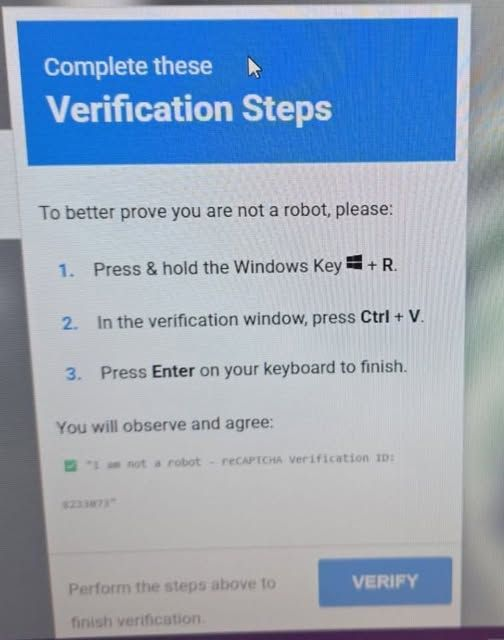
Take a close look at this image!
If you ever see a pop-up like this while browsing, do not follow the instructions.
Cybercriminals are constantly changing their tactics. They know people are tired of CAPTCHAs and verification screens, so they are now creating fake ‘prove you are not a robot’ messages that look familiar and trustworthy.
The goal is simple: to trick you into running malicious code on your own computer.
🔍 How this attack works
The bait
A malicious website displays a fake verification or error screen, claiming you need to prove you are not a robot.
The hidden command
Behind the scenes, the website copies malicious code to your clipboard without you realising.
The trap
You are then told to press Windows Key + R, then Ctrl + V, and then Enter.
That might sound harmless, but it is not.
Windows Key + R opens the Windows Run box. If you paste and run the hidden command, you could give the attacker permission to execute malicious code directly on your computer.
In some cases, this can lead to stolen passwords, malware infections, remote access, or full compromise of your device.
🚫 The golden rule
Never paste unknown or unverified text into the Windows Run box, Command Prompt, or PowerShell.
A legitimate CAPTCHA will never ask you to open the Windows Run box or paste commands into your computer.
🛡️ Please share this with your team
These attacks rely on confusion and habit. The more people who know what to look out for, the less likely they are to fall for it.
If you see a pop-up asking you to press Windows Key + R, paste something, and press Enter, close the browser tab immediately and report it to your IT provider.



Comments